Introduction
Laptop Keyboard: A Complete Guide to Modern Laptop Keyboards explains the essential features, types, layouts, and functions of laptop keyboards. A keyboard is one of the main ways users interact with a laptop, whether they are typing documents, browsing the internet, studying, programming, or working. Modern laptops offer different keyboard designs, including membrane, scissor-switch, mechanical, and chiclet keyboards. This guide covers how these keyboards work, their important features, common layouts, keyboard problems, and useful maintenance tips.
What Is a Laptop Keyboard?
A laptop keyboard is the built-in set of keys used to enter text, numbers, commands, and shortcuts on a laptop computer. It is usually located above the touchpad and is designed to fit into the laptop’s compact body.
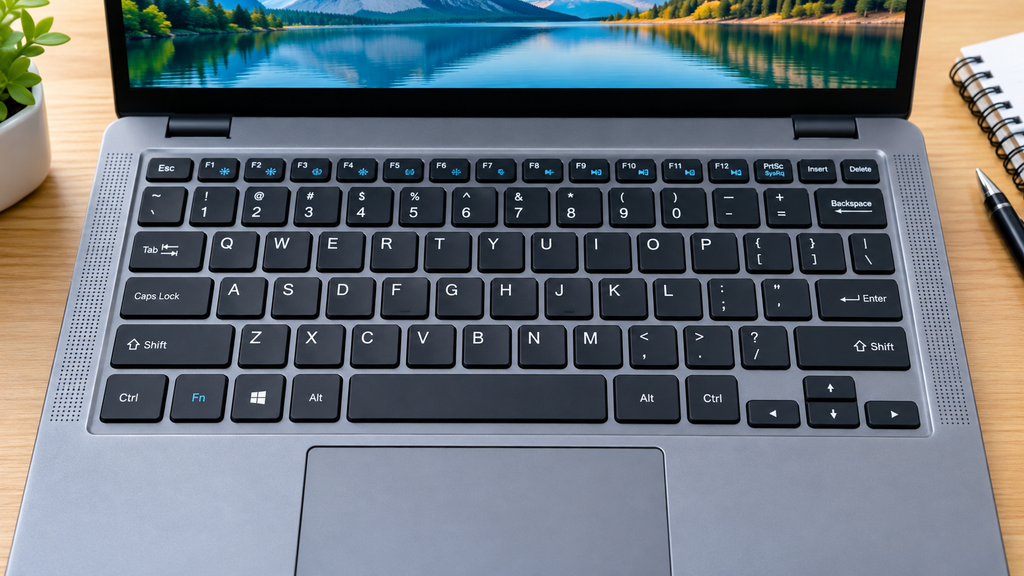
Most laptop keyboards include letters, numbers, function keys, arrow keys, and special keys such as Shift, Ctrl, Alt, and Enter. Some models also include a numeric keypad, backlit keys, or dedicated multimedia controls.
Unlike a desktop keyboard, a laptop keyboard is integrated into the computer, making it portable and convenient for everyday tasks such as typing documents, browsing the web, programming, and using applications.
The design and features can vary between laptop models, but the main purpose remains the same: to provide an efficient way to communicate with and control the computer.
Laptop Keyboard
A laptop keyboard allows users to type text, enter commands, and control different functions on a computer. Laptop keyboards come in several designs and layouts, with features that improve typing comfort, convenience, and usability.
Types of Laptop Keyboards
Membrane Keyboards
Membrane keyboards use a flexible membrane beneath the keys to register keystrokes. They are common in laptops because they are thin, lightweight, and generally affordable. They also produce relatively little typing noise.
Scissor-Switch Keyboards
Scissor-switch keyboards use small mechanisms under each key to provide stability and consistent movement. They are widely used in slim laptops because they offer a low-profile design and comfortable typing experience.
Mechanical Laptop Keyboards
Mechanical laptop keyboards use individual mechanical switches for their keys. They can provide more distinct key feedback and are often preferred by users who want responsive typing or gaming performance. They are less common than scissor-switch designs in standard laptops.
Chiclet Keyboards
Chiclet keyboards have flat, separated keys with small spaces between them. This design gives the keyboard a clean appearance and helps users distinguish individual keys while typing. Many modern laptops use this style.
Common Laptop Keyboard Layouts
QWERTY Layout
The QWERTY layout is one of the most widely used keyboard layouts. Its name comes from the first six letters in the top letter row: Q, W, E, R, T, and Y. Most laptops sold in English-speaking markets use this arrangement.
Function Keys
Function keys, usually labeled F1 through F12, perform different actions depending on the laptop and operating system. They may control settings such as screen brightness, volume, wireless connectivity, or application functions.
Number Row and Numeric Keypad
The number row is located above the letter keys and contains numbers from 0 to 9. Some larger laptops also include a separate numeric keypad, which is useful for entering numbers and performing calculations quickly.
Navigation and Arrow Keys
Navigation keys help users move through documents, webpages, and menus. Arrow keys control movement, while keys such as Home, End, Page Up, and Page Down can help navigate longer content.
Important Laptop Keyboard Features
Backlit Keys
Backlit keyboards have built-in lighting beneath or around the keys. This makes the letters easier to see in low-light environments and can be useful when working at night.
Dedicated Function Keys
Some laptops provide dedicated keys for specific functions such as volume control, screen brightness, airplane mode, or launching applications. These keys allow users to access common controls quickly.
Multimedia Controls
Multimedia controls let users manage audio and video directly from the keyboard. Depending on the laptop, these controls may include play, pause, volume adjustment, and mute functions.
Spill-Resistant Design
A spill-resistant keyboard is designed to reduce the risk of damage from small amounts of liquid. However, it does not necessarily make the laptop completely waterproof, so liquids should still be kept away from the keyboard.
Touch-Friendly Key Design
Touch-friendly keys are designed with a shape, spacing, and surface that make typing more comfortable and accurate. Proper key spacing can also reduce accidental keystrokes, especially during long typing sessions.
What Is a Laptop Keyboard?
- Definition of a laptop keyboard
- How it differs from a desktop keyboard
- Basic role of the keyboard
How Does a Laptop Keyboard Work?
- Key switches and electrical signals
- How keystrokes reach the operating system
- Role of keyboard drivers
What Are the Function Keys on a Laptop?
- F1–F12 keys
- Fn key
- Common shortcuts and controls
Laptop Keyboard Shortcuts You Should Know
- Copy and paste
- Search
- Switching between applications
- Screenshot shortcuts
- Locking the computer
How to Use a Laptop Keyboard Efficiently
- Proper typing technique
- Useful keyboard shortcuts
- Improving typing accuracy
- Using function and modifier keys
How to Clean a Laptop Keyboard
- Turn off and unplug the laptop
- Remove dust and debris safely
- Clean the key surfaces
- What cleaning methods to avoid
What is a laptop keyboard?
A laptop keyboard is the built-in set of keys used to type text, enter numbers, and perform commands on a laptop.
What are the most common types of laptop keyboards?
Common types include membrane, scissor-switch, mechanical, and chiclet keyboards. Scissor-switch and chiclet designs are widely used in modern laptops.
Why is my laptop keyboard not working?
A keyboard may stop working because of software issues, incorrect settings, outdated drivers, dirt, or physical damage. Restarting the laptop and checking the keyboard settings can help identify the problem.
Can I replace my laptop keyboard?
Yes, many laptop keyboards can be replaced. The replacement process depends on the laptop model and may require professional repair.
How do I clean a laptop keyboard?
Turn off the laptop first, then gently remove dust and debris using a soft brush or compressed air. Wipe the keys with a slightly damp, soft cloth and avoid applying liquid directly to the keyboard.
Are laptop keyboards waterproof?
Most laptop keyboards are not completely waterproof. Some models have spill-resistant designs, but liquids can still damage the keyboard or other internal components.
Can I use an external keyboard with a laptop?
Yes. You can connect an external keyboard through USB or Bluetooth, depending on the keyboard and laptop. This can provide a different typing experience or replace a damaged built-in keyboard
Pingback: Laptop Keyboard: A Complete Guide to Types, Features, Problems, and Buying Tips
Pingback: What Is a Laptop Keyboard? Complete Guide for Beginners